The day started with an introduction to feed readers such as the Google Reader and the concept of RSS feeds. I've been using Google Reader to read blogs for a couple of years now, so I was already pretty familiar with the information presented.
We also talked about "web desktop" apps, which are basically applications that allow you to have a desktop environment embedded in a browser. This was a new concept for me, and we looked at Pageflakes, Netvibes and iGoogle. I like the idea, but I'll need to do some more research and experimentation with those tools to get a better idea of how we might apply them in to corporate education.
One tool I found to be very interesting was delicious.com. This is what is called social bookmarking, which means you can save all your bookmarks online, share them with other people, and see what other people are bookmarking. Delicious keeps all your bookmarks in one place so you will never lose track of your bookmarks again. Since they store your bookmarks online, you can get to them from any computer, whether you're at home, at work or on the road. Most social bookmark services encourage users to organize their bookmarks with informal tags instead of the traditional browser-based system of folders. They also enable viewing bookmarks associated with a chosen tag, and include information about the number of users who have bookmarked them.
We practiced using delicious.com throughout the day, saving bookmarks that were shared in the workshop and tagging them SSS08 (an abbreviation for Summer Seminar Series 2008). Check out our ongoing list here: http://delicious.com/tag/sss08.
I can see a some applications for this. For example, following a class on a specific leadership topic, we could assign a unique tag such as AFLead08 an ask the participants to use delicious.com to save and tag any bookmarks they find on that topic with the AFLead08 tag. A developer could use those tagged sites for future revisions of the course, or an instructor could use them in a future class on the same topic.
We also talked quite a bit about blogging, which you are viewing an example of right now. There are endless possibilities for blogging in our environment, such as what I'm doing by sharing what I've learned in a workshop for others to read. A blog can also be used to share interesting and applicable YouTube videos, such as this one that we watched today:
The blog application of choice today was Blogger, and several people worked together and found out how simple it is to create and maintain a blog on the web.
While those people were creating blogs, another group was creating wikis using another free site - pbwiki.com. I spent my time working with a group that was exploring web desktop applications since I was already familiar with blogs and wikis.
Regarding blogs and wikis, we had a lengthy discussion about control:
- What if people say bad things?
- what if people say wrong things?
- What if people say secret things?
- What if they don't?
- What if they collaborate and share?
- What if they find new business?
- What if they share best practices?
To summarize, there are countless tools out there, and as an organization we have a lot to learn. We talked a little about other social media applications such as LinkedIn and Facebook, both of which I've been getting familiar with recently. There are MANY, MANY more. Click the following image for a visual representations of some things we talked about today:
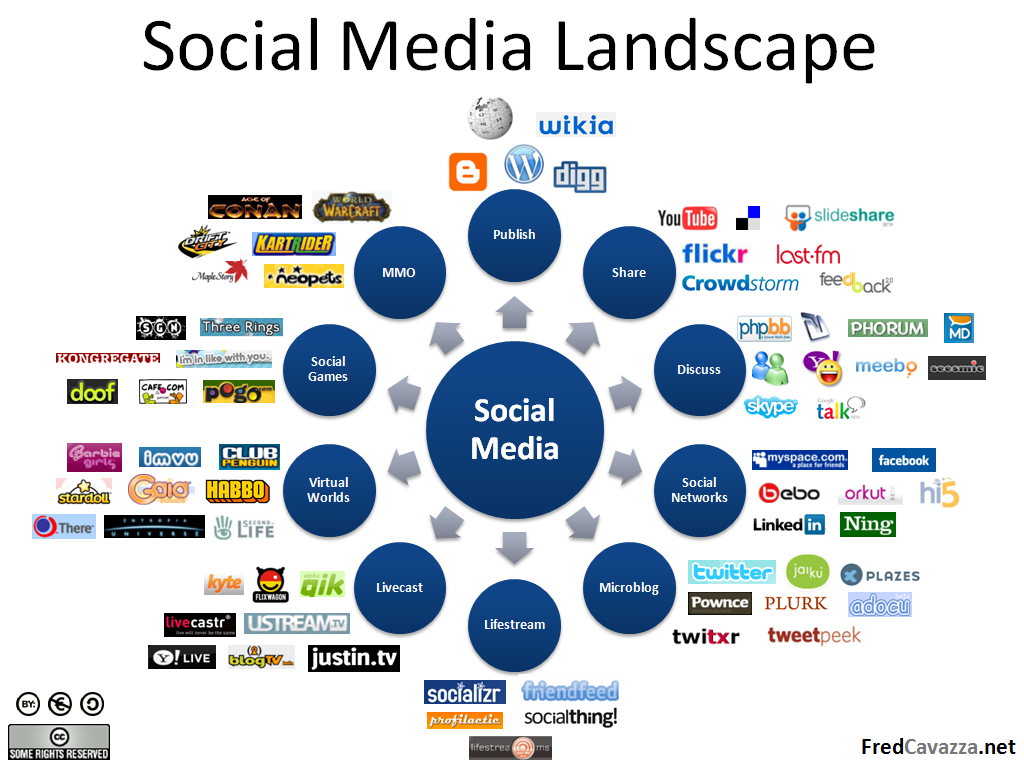
Tomorrow, I'm looking forward to talking about twitter and lots of other applications that could be useful. Stay tuned...


No comments:
Post a Comment